
Redux with React: Multi Components Way
Introduction
Welcome to the last and the shortest post of the series called, A blend of Redux and ReactJs - State Management Made Easy! This post is built lots based on previous two posts of the series,
Hence having a prior walk-through on these posts would be helpful.
Why multiple components?
Well, most(Can I safely say, all?) of the applications will have more than one components interacting and may be in some sort of relationships(parent-child, siblings etc). State management may gets trickier in these cases if things are not taken care well. Use of Redux can come really handy.
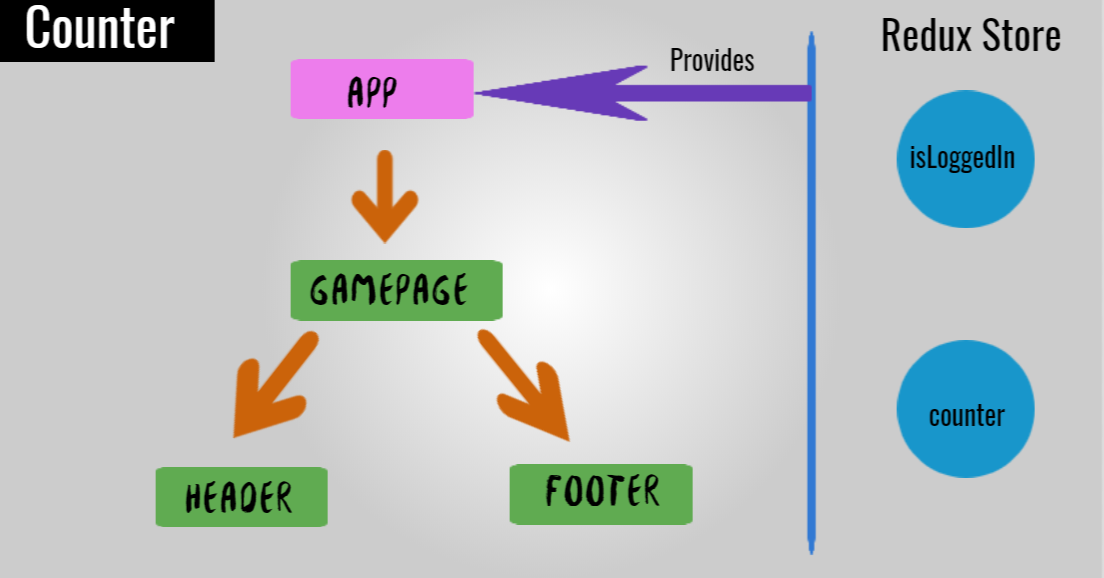
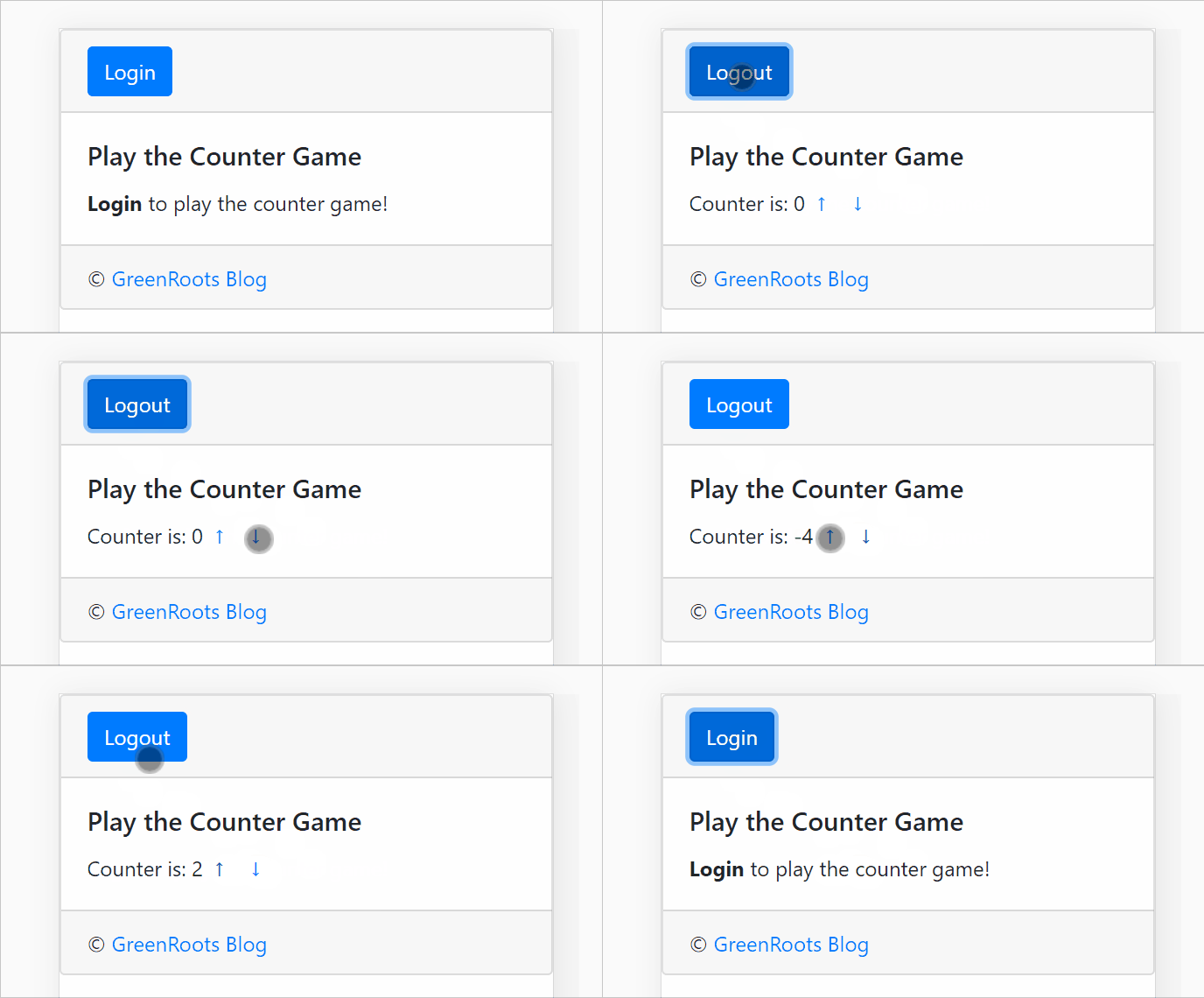
In this post, we will take such example where we will have a Login component(fake one, for the sake of the post!) and a Game component which is nothing but the Counter from the previous post. We will allow our users to play the Counter game only when they are logged-in successfully.
Let's set things up
We will create two actions for Sign-in(login) and Sign-out(logout) respectively.
export const signIn = () => {
    return {
        type: 'SIGNIN'
    }
};

export const signOut = () => {
    return {
        type: 'SIGNOUT'
    }
};
Remember we need a reducer to act as prescribed by the actions? Here is how our Reducer would look like,
const loggedInReducer = (state = false, action) => {
    switch(action.type) {
        case 'SIGNIN':
            state = true;
            return state;
        case 'SIGNOUT':
            state = false;
            return state;
        default:
            return state;
    }
}

export default loggedInReducer;
As we spoke about combining the reducers in last post, the combined reducer may look like,
const allReducers = combineReducers({
    counter: counterReducer,
    isLoggedIn: loggedInReducer
});
Let's get the components done
As we have the action and reducer set up now, let us create required components. We will have components,
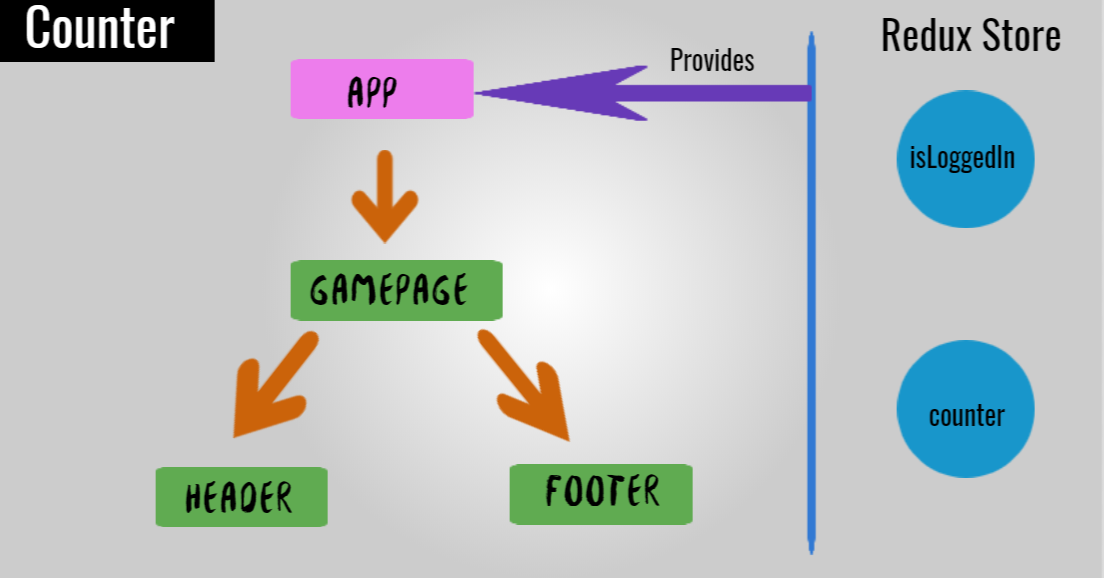
Header: Holds a 'Login' button to sign-in to the app. It also changes to 'Logout' based on the state!Footer: Simple reactjs component got nothing but a copyright text.GamePage: We useHeaderandFooterhere. Actual counter logic also takes place based on the sign-in state.App: Place where we use theGamePagecomponent.
Header Component
The Header component with the Login/Logout behavior based on the isLoggedin state from the store.
import React from 'react';
import { useSelector, useDispatch } from 'react-redux';
import { signIn, signOut } from './actions';


const Header = () => {
    const isLoggedIn = useSelector(state => state.isLoggedIn);
    const dispatch = useDispatch();
    return (
        <React.Fragment>
        {isLoggedIn
            ?
                <button onClick={() => dispatch(signOut())}>
                    Logout
                </button>
            :
                <button onClick={() => dispatch(signIn())}>
                    Login
                </button>
        }
        </React.Fragment>
    )
}

export default Header;
GamePage Component
GamePage shows the counter part based on the isLoggedIn set to true or not. It is confirmed by reading the state from the Store.
import React from 'react';
import { useSelector, useDispatch } from 'react-redux';
import { increment, decrement } from './actions';

import Header from './Header';
import Footer from './Footer';

const GamePage = () => {
    const counter = useSelector(state => state.counter);
    const isLoggedIn = useSelector(state => state.isLoggedIn);
    const dispatch = useDispatch();

    return (
        <React.Fragment>
            <Header />
            <div>
            {isLoggedIn
                ?
                <div>
                    <h1>Play Counter Game: { counter }</h1>
                    <button onClick={() => dispatch(increment())}>
                        +
                    </button>
                    <button onClick={() => dispatch(decrement())}>
                        -
                    </button>
                </div>
                :
                <div>
                    <span>Login to play the counter game!</span>
                </div>
            }
            </div>
            <Footer />
        </React.Fragment>
    )
}

export default GamePage;
App Component
App is as simple as,
<div className="App">
   <GamePage />
</div>
App is provided the store as(in index.js),
const store = createStore(
    allReducers
);

ReactDOM.render(
    <Provider store={store}>
        <App />
    </Provider>,
    document.getElementById('root')
);
That's all about it! If you have followed last couple of posts from the series, this one may sounds like bit of repeat and revise. But it is important to note that, we are talking about state management with multiple components here.
You can find the code used in this post in my GitHub Repo.
Conclusion
Redux is powerful but is it something to use always in a ReactJs app? My answer is, absolutely NO. It depends on the needs.
ReactJs provides Context API(now with hook too) which may solve the same problem as Redux does in many cases. Can we replace redux with context? Why not? We should wherever it makes sense. But we need to be clear of the differences:
Reduxis a predictable state container for JavaScript apps.Contextprovides a way to pass data through the react component tree without having to pass props down manually at every level.
In a complex app if something(state) needs to be maintained globally that may need high-frequency updates, Redux may be the way to go. However there is no need at all to start with the Redux from the beginning itself without any clear need identified.
The rule I would like to follow is, You should always Start the project without Redux if you feel you don’t have any need of it. It is absolute fine and viable to implement it later if the need arises.
Hope this post and the series was informative and useful. Thanks for reading through.
About the author
Co-Founder, @CreoWis | Teacher, @tapaScript | Founder, @ReactPlay | YouTuber | Writer | Human
Comments
Join the discussionNo comments yet. Be the first to comment.
A blend of Redux and ReactJs - State Management Made Easy!
Redux, the super cool state management tool is easy to learn and awesome to put in practice. How cool it would be when we use it with ReactJs in a meaningful way. Welcome to the series to explore it!


