
Gatsby - the window is not defined error, what and how to fix it?
Gatsby is one of the most popular Static Site Generators available to create pre-built markups for Jamstack apps. It is a React-based framework that offers a plethora of plug-in ecosystems to make life comfortable for the developer community. I have been using Gatsby for a couple of years now, and my experience is very good with it except for a few glitches.
We will talk about one such glitch that I have faced and luckily found reasonable solutions for it. I hope you find it useful.
What is the 'window not defined' error?
You can run a Gatsby-based application in two different environments,
gatsby develop: A development environment enabled with hot-reloading. In this environment, all browser-specific APIs likelocalstorage,or the globals likewindow,document,etc., will work well.gatsby build: It is the environment to build the application to produce deployable artifacts. You can even run the app locally from the deployable artifacts using thegatsby servecommand. Unlike thedevelopmentenvironment, thebuildenvironment is based onnodejs.The nodejs environment doesn't have the browser-globals like
window,document, etc. Hence if the source code has a reference to them, you are more likely to get a build failure with the error,window is not defined.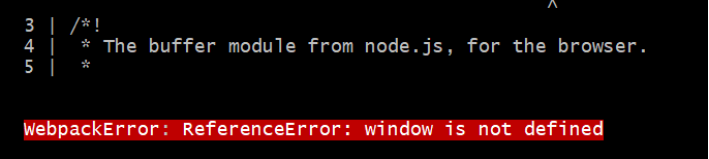
Please note: You may also face this error when you use a client-side library(maybe, an npm) that contains a reference to
window,document, etc.
How to fix the 'window not defined' error?
There are multiple ways to fix/ignore this error. You may want to use the one most suitable for you.
Check if window is defined
You can check if the browser-global object window is defined and based on it, execute the related code block.
const isBrowser = typeof window !== "undefined"
The variable isBrowser helps you to determine if the window object is available in the environment. Let's use it to check and call a method to get an item from the browser's local storage.
export const isAuthenticated = () => {
  if (!isBrowser) {
    return;
  }

  return window.localstorage.getItem("isLoggedIn") === "true"
}
You can also consider writing it as a simple util function like,
// utils.js

export const isBrowser = () => typeof window !== "undefined"
and then use it elsewhere,
import { isBrowser } from './utils';

if (!isBrowser) {
    return;
}

// ... other code
Using useEffect hook or componentDidMount method
Gatsby is a React-based framework. If the problematic code is in the component's render function, move that code into a useEffect hook or a componentDidMount lifecycle method. It will ensure the code doesn’t run unless it’s in the browser.
Handling at the Configuration level
You can also fix/ignore this error at the configuration level. This solution is more apt for the third-party modules/libraries/npms depending on the window object. You can customize your webpack configuration to replace these modules with a dummy module during server rendering.
To do that, open the gatsby-node.js file and add this at the end of the file,
exports.onCreateWebpackConfig = ({ stage, loaders, actions }) => {
  if (stage === "build-html") {
    actions.setWebpackConfig({
      module: {
        rules: [
          {
            test: /offending-module/,
            use: loaders.null(),
          },
        ],
      },
    })
  }
}
The word offending-module has to be replaced with the actual module name. For example, if you are using auth0 with Gatsby, you can mention the module name as auth0-js in the above configuration. Using Webpack’s null loader, we will effectively ignore auth0-js during the build.
I hope you find the article useful. If you enjoyed this article or found it helpful, let's connect. You can find me on Twitter(@tapasadhikary) sharing thoughts, tips, and code practices. You may also like,
- JAMstack for All: An Introduction
- JAMstack vs traditional monolithic workflow
- What is a Static Site Generator and how to select one?
- How to build a serverless app with Gatsby, Netlify and FaunaDB
P.S. I love Coffee ☕. 
About the author
Co-Founder, @CreoWis | Teacher, @tapaScript | Founder, @ReactPlay | YouTuber | Writer | Human
Comments
Join the discussionInformative article as always, Tapas Adhikary. Thanks for sharing.
Great to know Rahul you found it helpful.
Great article, as always!
P.S: I love coffee too!
Thanks Catalin Pit. Yeah, let's meet over coffee sometime 😃.
Sure thing Tapas Adhikary!


