

Introduction
Welcome to the third post of the series, JavaScript: Cracking the Nuts. In this post, we will learn about another fundamental JavaScript concept called Hoisting.
As the series's focus is to get to the basics and internals of every concept, we will try exploring the internals of Hoisting here than just scratching the surface.
If you haven't got a chance to read through the earlier posts of the series yet, you can find them here:
What do we know so far
Here is some recap from the last few posts of the series:
- In JavaScript, the source code typically goes through several phases before it is finally executed. The phases are, Tokenizing, Parsing, and Code Generation.
- Whenever a JavaScript code runs, it creates something called Execution Context. It helps in determining what code is currently running and helps in allocating memory for every function and variable declarations it finds on the way.
The mechanism of allocating memory for the functions and variable declarations within an Execution Context is called Hoisting.
Demystifying some Myths
The word Hoisting is confusing and misleading in the context of what is actually happening here. That is one reason why many of the explanations of Hoisting are focused on the fact that variables and functions are hoisted.
In plain English, Hoisting meaning, raise (something) using ropes and pulleys. At some point, one may start believing that things(variables and functions) actually being hoisted by moving their position up by the JavaScript engine.

Hey, relax, nothing like that ever happens! Honestly, no code physically gets hoisted. It is all about how memory is allocated for functions, variable declarations in an Execution Context's Creation Phase.
We will see that with examples soon.
Variable Hoisting
Consider this simple code:
console.log('name is ', name);
var name;
name = 'tom';
console.log('name is ', name);
What's the expected output of the above code? Well, it is easy:
name is  undefined
name is  tom
The question is, why? We have accessed the variable name well before it has even been declared. Like many other programming languages, we should have got an error. But instead, we got undefined.
in JavaScript, the code execution context is divided into two phases:
- Creation Phase
- Execution Phase
In the creation phase, the memory gets allocated for the variables and initialized with a special value called undefined.
The meaning of
undefinedis, a variable has been declared, but it has no value assigned.
In the code example above, the creation phase declared the variable name by allocating memory for it and marked it as undefined. This phenomenon is called Variable Hoisting in JavaScript.
Later in the execution phase, the value tom gets assigned to the variable name, and the console log statements get executed. As the creation phase happens before the execution phase, we find the variables are already declared, i.e., created in memory(as in Hoisted).
Function Hoisting
Function hoisting follows a similar path to variable hoisting. In function hoisting, JavaScript Execution Context's creation phase put the function declaration into memory. Let us understand it with this example:
// Invoke a function, chase()
chase();

// Declare a function, chase()
function chase() {
  console.log('Tom chases Jerry!');
  // Invoke a function, caught();
  caught();
}

// Declare a function, caught()
function caught() {
  console.log('Tom caught Jerry :(')
}
The creation phase of the Execution Context creates a memory for the function chase(), and the entire function declaration has been put into the memory. In the execution phase, the entire function of the memory can be executed.
As we know, the function creates its own execution context(Function Execution Context), the mechanism remains the same in the function execution context. First, create a memory for caught() and put the declaration into it. Later execute it.
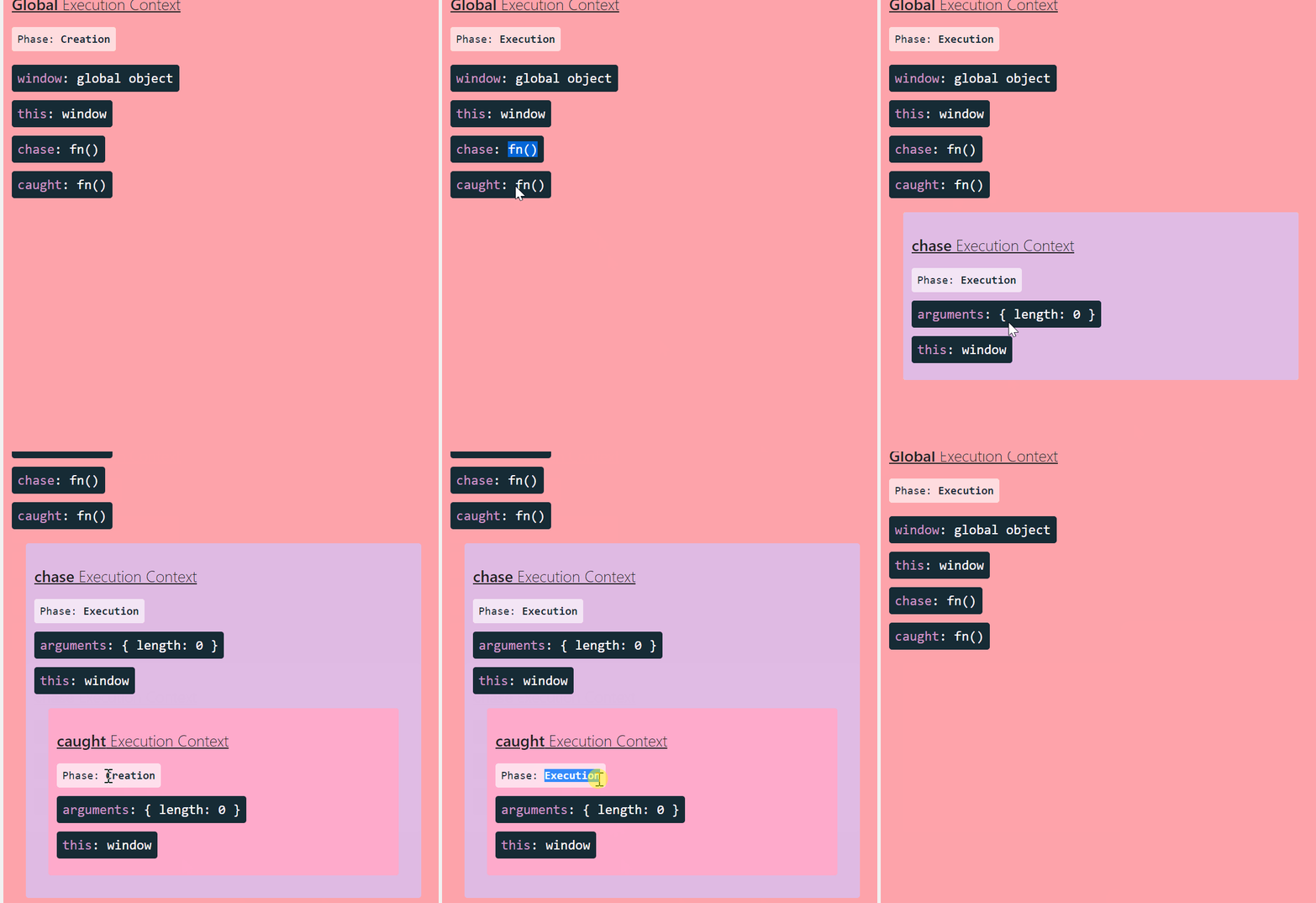 Created using https://tylermcginnis.com/javascript-visualizer/
Hoisting Rules
A general rule of thumb is to always define functions, variables, etc., before using them in code. This can help in avoiding surprises and debugging nightmares.
There are a few guidelines and checks already put into JavaScript language to safe-guard from the pitfalls of using Hoisting without realizing it.
JavaScript only hoists declarations, not initialization. With this, the following code is going to break:
test();

var test = function() {
  console.log('I am being tested');
}
It will throw the following error because the
testdeclaration is hoisted and initialized withundefinedas a value. It was never assumed to be a function. It was, in fact, hoisted as variable hoisting, not function hoisting.
letandconstdeclarations are hoisted, too, but they are not initialized toundefinedlikevar. See the example here:console.log(foo); let foo;This will throw the following error but, it will just run fine with
var:
Conclusion
As mentioned above, always define functions, variables, etc., before using them in code. Do not rely on Hoisting much. At the same time, it is important to understand the underlying concept of why certain things are behaving in specific ways.
I hope you find the article useful. Please Like/Share so that it reaches others as well. If you enjoyed this article or found it helpful, let's connect. You can find me on Twitter(@tapasadhikary) sharing thoughts, tips, and code practices.
To get e-mail notifications on my latest posts, please subscribe to my blog by hitting the Subscribe button at the top of the page.
In the next post of the series, I'll be explaining another fundamental concept called Scope. Stay Tuned.
About the author
Co-Founder, @CreoWis | Teacher, @tapaScript | Founder, @ReactPlay | YouTuber | Writer | Human
Comments
Join the discussionhere both caught() and chase() will be created in global execution context, not like caught() hoisted in the execution context of chase() function
JavaScript: Cracking the Nuts
In this series, I'll bring some fundamental concepts from JavaScript to you. It is going to be fun learning for JS Beginners(and for Experienced folks too) to get the foundation right.


