
How I attempted Image Classification in the browser using ml5.js and React
Co-Founder, @CreoWis | Teacher, @tapaScript | Founder, @ReactPlay | YouTuber | Writer | Human
Motivation
Since my Machine Learning Journey had started, I am very much lost into the crowd of Python , TensorFlow, Understanding Deep Learning and Neural Network.
While all these are pure fun and intense learning, I was missing something similar to run in the browser. Additionally, there is a huge side of Machine Learning(ML) use-case where an individual doesn't have to learn all the underlying facts of ML rather, can use all the hard work done by others to do something cool. Here is one such we will be seeing in next 3-4 minutes.
Relax, as a reader of this story you do not need any prior experience in Machine Learning or anything related to it. Keep Reading, you are going to like it.
Understanding Image Classification from the top of Mount Everest(29,029 ft)
Image Classification is a machine learning problem where we define a set of targets(objects like, Car, Cat, Dog, Boat etc. to identify in the images ), train a model to recognized them using labeled example(sample) photos.
To understand this more easier way,
- We first need to teach the Computer(that's basically the Machine) how a Car, Cat, Dog or Boat look like. This phase is called,
Training. - Car, Cat, Boat, Dog etc are called,
Labels. - Various type of Samples of Car, Cat, Boat, Dog etc are called,
Labeled Examples. - More such objects Computer sees, the better it gets in its prediction to identify more similar kind of objects. For example, if we train the computer more on showing the images of boats, it will probably get better in recognizing boat images later. This is known as, Supervised Learning.
- All these teaching-learning-predicting by machine is achieved by various algorithms which are known as,
Machine Learning Algorithm. - We provide the training data(images) to a machine learning algorithm to learn from and generate a Machine Learning
Model.
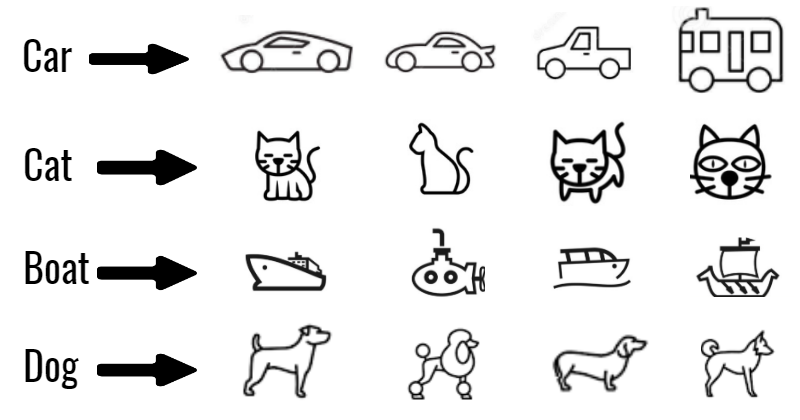 Image Classification of Car, Cat, Boat, Dog objects
Our Image Classification problem
With the knowledge gained so far, let us dive into the problem in hand. We will be building a web app to,
- Select the images of our choice using an image selector. - BYOI: Bring Your Own Image!
- Select images from some out-of-the-box image list.
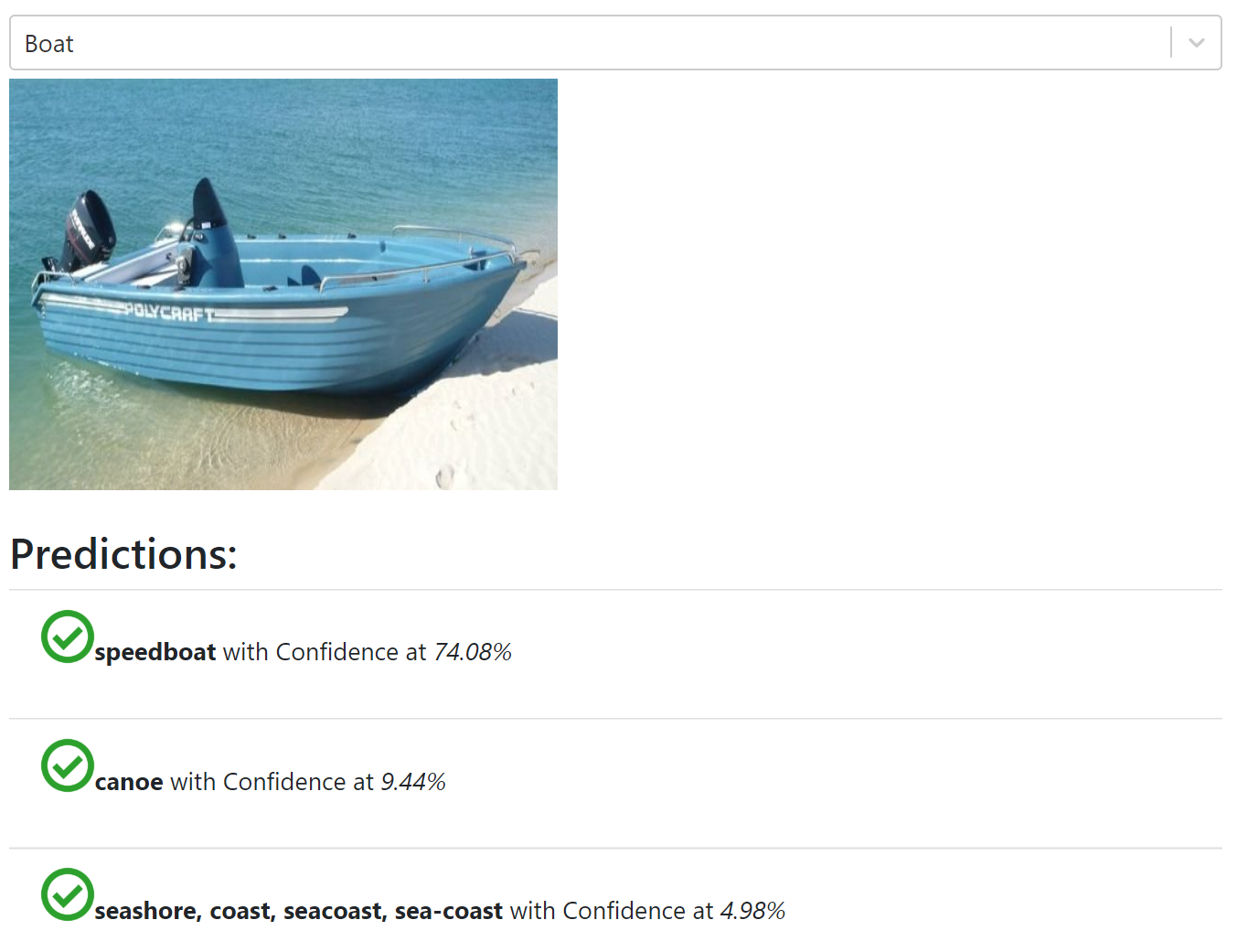
- Perform Top-3 prediction on those images.
- Publish the prediction result with the Probability Percentage of them matching a real-world object.

Also, we will least worry about how the model gets created, what algorithm runs at the back to achieve it etc. These are important but not so much for the use-case we are focusing on here.
Demo
All excited about it? Let's see it in action: ml-greenroots-info
Let's talk about the Technologies
There are plenty of options out there to try JavaScript based ML library or tool-kit to do Machine Learning in the browser. Some are to solve basic problems and few are advanced like, TensorFlow.JS.
- For my use-case I opted for a Friendly Machine Learning library for Web called, ml5.js. This library provides access to machine learning algorithms and models in the browser, building on top of TensorFlow.js with no other external dependencies 👍.
- Reactjs, simply because I love it 😄! You can use any other UI libraies or Framework of your choice.
Dive Deeper
Here are some key steps that will help to set up ml5.js with react and get started with it:
- You can start with a react project using the create-react-app or, with Gatsby.js or, by any other means.
- Get started with
ml5.jsby installing it using npmnpm i ml5 - Import
ml5.jsinto your React componentimport * as ml5 from "ml5"; - With
ml5.js, you can make use of various open sourceModelproviders like, MobileNet, YOLO etc. without worrying too much about the underlying facts. For this project I am using, MobileNet. - We will be getting a classifier to perform Image Classification as:
// Initialize the Image Classifier method with MobileNet const classifier = ml5.imageClassifier('MobileNet', modelLoaded); // When the model is loaded function modelLoaded() { console.log('Model Loaded!'); }MobileNet. Once we have the classifier, next action is to Classify the Image and perform Prediction. This is going to be super easy! Have a look into this code:
  // Make a prediction with a selected image
  classifier.predict(image, 3, function(err, results) {
    if(err) {
      console.log(err);
    }
    return results;
  }).then((results) => {
    // set the prediction in state and off the loader
    this.setLoader(false);
    this.setPredictions(results);
  });
Neat, right? We call the
predictmethod by passing the image, number of predictions required(3, in this case) and a call-back to handle once the Prediction is done.Once the Prediction is done, we are just setting some state in React component and using it for rendering. That's all about the Machine Learning part of the code. Rest of it is, just the react component related methods and styles.
Follow the code and, contribute
You can check out the code in my GitHub repository :
This project is based on GatsbyJS and got a build-deploy-workflow hook established with Netlify. Please feel free to fork and send pull requests, if you have any great modifications or suggestions to the code.
You can also add your own components to do execute ML use-cases in the browser. Thank you!
Caveats
This blog post will not be complete without mentioning some of the Caveats:
Machine Learning in the Browser is picking up. However the performance of the ML Algorithms in the browser will not be that great. One should decide to use it based on the use-case in hand and the target persona in mind.
With the availability of the tools and libraries supporting it, we are all encouraged to try it out. To me, a project like this is an entry point to learn Machine Learning deeper fold-by-fold, layer-by-layer.
If you access the github repo mentioned above, you will find a file called
ML5ImageClassification.jswhich is the React component doing all that magic.However this might not be the best code you would see and, that is intentional. Because I am planning to re-write the code using react hooks to showcase, how an existing react project can be modified with hook easily and effectively✨✨✨. Stay Tuned!
Credits and Resources
- Cover Photo by Soragrit Wongsa on Unsplash
- A great read on Image Classification using TensorFlow.js
- GitHub page of ml5.js
- The cat-dog animation gif from here
If you have read through and reached so far, Great! Thank You very much. Hope you liked the post. Please comment and share.


